All you need to do is have developer mode enabled.
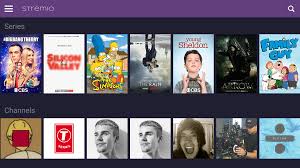
📺 What is Stremio?
Stremio is a powerful media center app that lets you stream movies, TV shows, live TV, and web channels. It works using add-ons, both official and community-created, to aggregate content from various sources.
Pairing Stremio with Real-Debrid gives you access to high-quality, buffer-free streams by unlocking premium host links.
🔽 Step 1: Download and Install Stremio APK
- Open the Downloader app.
- In the URL box, type the downloader code 4244746, which will take you to our Tool Box page and let you download Stremio directly.
- Scroll and select the Android TV version of Stremio (usually a
.apkfile). - Download and install it. When prompted, click Install.
- Once installed, select Done, and delete the APK to save space.
🧰 Step 2: Set Up Stremio
- Open the Stremio app from Your Apps & Channels.
- Sign in using:
- Email/password
- Guest account (limited features)
Recommendation: Use a Stremio account (not guest) to sync add-ons and Real-Debrid across devices.
🔌 Step 3: Install Add-ons in Stremio
- Go to the puzzle icon (Add-ons tab).
- Click Community Add-ons.
- Install popular add-ons like:
- Torrentio
- PirateBay Addon
- Zoogle
- Rarbg
These torrent-based add-ons benefit most from Real-Debrid integration.
📥 Step 4: Install Torrentio Add-on
- Open the Stremio app on your Firestick.
- Click the puzzle piece icon on the top-right to access Add-ons.
- Scroll down to the Community Add-ons section.
- Find Torrentio and click Install.
🔔 This installs a generic version of Torrentio. For Real-Debrid to work, you need to configure a personalized version.
🔗Visit the Torrentio Configuration Tool
- On your phone, tablet, or computer, go to:
https://torrentio.strem.fun/configure - This will open the Torrentio Config Generator.
You now need to build a custom Torrentio add-on configuration that includes your Real-Debrid credentials.
Customize Torrentio Settings
Here’s how to fill out each section:
🔧 General Settings:
- Video Quality Preferences: Choose your preferred resolutions (e.g. 1080p, 4K).
- Sort by: Choose how results are sorted (default is usually by seed count or quality).
- Enable Anime Category: Optional
- Enable NSFW Category: Optional
🌐 Providers:
- Enable or disable public providers like:
- The Pirate Bay
- 1337x
- RARBG
- It’s usually best to leave these on for more sources.
💎 Debrid Services:
- Under “Debrid services”, check the box for Real-Debrid.
🔑 Authorize Real-Debrid:
- Click “Sign in with Real-Debrid”.
- A pop-up will give you a device code (e.g. ABCD1234).
- On a separate browser tab, go to:
https://real-debrid.com/device - Enter the code and click Continue.
- If prompted, authorize “Torrentio” to access your Real-Debrid account.
- Return to the configuration page — it will now show “Authorized” under Real-Debrid.
🧩 Optional Advanced Settings:
You can:
- Limit number of links per provider
- Enable/disable trackers
- Block specific keywords (e.g. CAM, TS for poor quality)
Copy the Custom Add-on URL
Once you’ve finished configuring:
- Scroll to the bottom and click “Generate Add-on Link”.
- A custom URL will be displayed, like:
https://torrentio.strem.fun/addon/xyz123456789.json - Copy or write down this link.
📌 This is a personalized version of Torrentio that includes your Real-Debrid access and custom settings.
Install the Custom Torrentio Add-on in Stremio
- Go back to your Stremio app on Firestick.
- In the Add-ons section, scroll to the bottom and click:
- “Install Add-on via URL”
- Paste or enter the custom URL you copied earlier.
- Click “Install”.
You’ve now installed a custom Torrentio add-on that is fully linked to Real-Debrid and configured with your preferences.
Start Streaming with Real-Debrid
- Go to Discover and search for any movie or TV show.
- Click on a title, then choose Watch.
- You’ll now see multiple sources, including those labeled:
- Real-Debrid / 1080p / Torrent
- 4K / Real-Debrid
- These are high-speed, premium-quality streams coming directly from your Real-Debrid account.
⚠️ If you only see public streams, double-check that your custom Torrentio add-on is installed and your Real-Debrid account is authorized.
✅ Step 5: Start Streaming with Real-Debrid
Once configured:
- Search for a movie or TV show.
- Click on a title, and wait for streaming sources to populate.
- You’ll now see Real-Debrid links—these are marked and often labeled as “1080p / Real-Debrid / Torrent.”
These are higher quality and load significantly faster than public links.
🔐Bonus Tip: Use a VPN
We strongly recommend using a trusted VPN like Fastest VPN when using these apps. This helps protect your identity and prevents ISP throttling.
Final Thoughts
With Developer Mode enabled and these top Downloader codes, your Firestick transforms into a powerhouse streaming device. Whether you’re after live sports, blockbuster movies, or binge-worthy shows, there’s something on this list for everyone.
🧠 Pro Tip: Bookmark this post to stay updated—Downloader codes change frequently, and we’ll update this list as new apps rise in popularity.
📜 Legal Disclaimer
The content provided on this website is for educational and informational purposes only. We do not host, distribute, or promote any illegal content or third-party applications that violate copyright laws or Amazon’s terms of service.
Enabling Developer Mode on your Amazon Firestick is a built-in feature provided by Amazon for developers and advanced users. Our guides are designed to show you how to access this feature legally and responsibly. We do not encourage or endorse the use of Developer Mode for unauthorized access to copyrighted material, digital piracy, or any activity that violates applicable laws or platform terms.
By using this website, you acknowledge and agree that:
- You are solely responsible for how you use the information provided.
- You will comply with all applicable local, state, federal, and international laws.
- You understand that modifying your Firestick may void warranties or violate Amazon’s terms of use.
We strongly recommend using a trusted VPN like Fastest VPN and only installing trusted applications from reliable sources. This site assumes no liability for any legal issues, technical problems, or consequences resulting from your use of Developer Mode or any third-party applications mentioned.
If you do not agree with this disclaimer, please refrain from using this website.

 Total freedom on your Firestick.
Leave a comment